← New in role

The first job kit

You are new to marketing. This is your first job in it.

The free courses end at the certificate. This kit picks up where they stop: what to learn and do in your first month, what to ask your manager in week one, and how to be useful before you are an expert.

Written by the WarmUp team. We taught revenue engineering in public through Clay Club and REVelry. Last updated . Open to everyone. No form, no email.

Checklist

Your first 30 days in a B2B marketing job

Nobody expects you to be good at this yet. They expect you to learn how this company makes money, and to be reliable with small things. Both are within reach in a month.

This list is what to learn and do, in order. Tick things off as you go, and skip what does not apply to your company.

Week 1: learn how the company makes money

  • Write down, in one sentence, what the company sells and who pays for it.
  • Find out who the customers are, and which kinds of companies buy most often.
  • Read three won deals in the customer relationship management system (CRM), start to finish.
  • Learn what counts as a lead here, and who decides that.
  • Listen to two or three sales calls, or read the notes from them.
  • Find out which numbers your manager is judged on.

Week 2: learn the tools you will touch

  • Get your logins for every tool you will use, and check that each one works.
  • Ask which tool holds the truth when two of them disagree.
  • Learn where campaign results are recorded, and who updates them.
  • Follow one lead from the first form fill to the hand-over to sales.
  • Keep a running list of terms you did not know, and look them up at the end of each day.
  • Ask which settings or lists you should never change without asking first.

Week 3: ship one small thing

  • Ask your manager for one small task you can finish end to end.
  • Agree on what done looks like before you start.
  • Do the task, and ask for a quick check before anything goes out to customers.
  • Write down how you did it, step by step, so the next person can repeat it.
  • Note anything that took longer than it should have, and why.

Week 4: show what you learned

  • Reread your list of terms and cross off the ones you now understand.
  • Explain how a lead becomes a customer here to someone, in your own words.
  • Pick one thing you would like to own next month.
  • Send your manager a short note with what you learned, what you shipped, and what you want to learn next.
  • Ask for one piece of feedback on how the month went.

Some things can wait. You do not need a certificate in every tool this month. You do not need opinions on strategy yet. You do not need to post about your new job while you are still learning it.
Questions

Questions to ask your manager in week one

Asking good questions early is how you become useful quickly. It shows you care about doing the right work, not just any work.

These are safe to ask, and the answers change what you do. Spread them over a few conversations in your first week. They are not an interrogation.

  1. What does a good first month look like to you?

    It tells you what you will be measured on before anyone says so. Aim at that, not at a guess.

  2. Which number is the team judged on, and where can I see it?

    Once you know the number, you can tell which tasks matter and which are busywork.

  3. Who are our best customers, and why did they buy?

    Everything you write and every list you build should point at people like them.

  4. What counts as a lead here, and what happens to one after marketing hands it to sales?

    This is where marketing and sales most often disagree. Knowing the rule keeps you out of the middle.

  5. Which tools will I use every day, and which one is the source of truth?

    When two tools show different numbers, you will know which one to trust and which one to fix.

  6. What is already running that I must not break?

    Live email sends, ads and forms are easy to change by accident. Knowing what is live lets you work without fear.

  7. Who should I ask when I am stuck, and how do they like to be asked?

    Some people want a quick message, others want it saved for a weekly meeting. Asking the right way gets you faster answers.

  8. How often do you want updates from me, and in what form?

    Too few updates looks like you are lost. Too many looks like you need reassurance. Their answer sets the rhythm.

  9. If someone held this role before me, what did they do well, and where did they struggle?

    It shows you what to keep doing and where the hard parts of the job are. If the role is new, ask what made them create it.

  10. What can I decide on my own, and what needs your yes first?

    It lets you move quickly on small things and avoid surprises on big ones.

  11. What is one thing you wish someone would take off your plate?

    It is often a small, repeatable task. Doing it well is the quickest way to become useful.

  12. How does the team already use AI tools or agents, and what are the rules?

    You will learn what is allowed, what data must stay private, and where agents already do part of the work.

Write the answers down the same day, while you still remember the details. Then repeat back the two that matter most in your own words, so your manager can correct anything you misheard.

Come back to your notes at day 30. Some answers will make more sense by then, and a few will have changed.

Picture

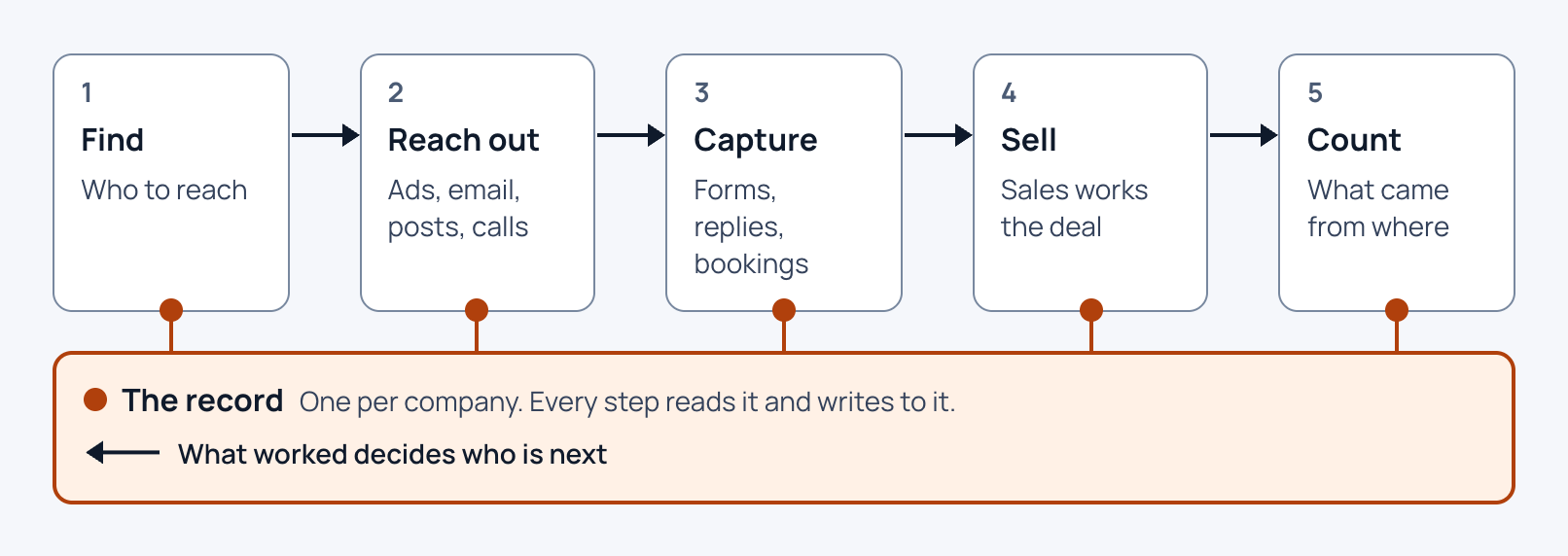
How a B2B revenue system fits together, in one picture

Every B2B company runs some version of the same five steps, whatever tools it uses, and keeps one record underneath them. Once you can see that, each tool you are handed has a place, and each task you are given has a reason.

Your company may call the steps by other names, and one tool may cover two of them. The order, and the record under it, are what to hold on to.

  1. 1

    Find

    Who to reach

  2. 2

    Reach out

    Ads, email, posts, calls

  3. 3

    Capture

    Forms, replies, bookings

  4. 4

    Sell

    Sales works the deal

  5. 5

    Count

    What came from where

The recordOne per company. Every step reads it and writes to it.

What worked decides who is next

The five steps of a B2B revenue system, in the order a lead moves through them, and the record every step reads and writes. Download the picture
The five steps and the record, and where you will meet them
PartWhat happens thereWhat you may be asked to do
FindThe company decides which companies and people are worth reaching, and builds lists of them. This is where the ideal customer profile (ICP) is put to work.Build or tidy a list, or check that the companies on it fit.
Reach outThe company gets in front of those people: ads, email, posts on LinkedIn, and calls from a business development representative (BDR).Draft an email or a post, set up an ad, or pull the list for a campaign.
CaptureSomeone raises a hand: they fill in a form, reply, or book a call. The moment of interest gets written down.Check that a form works and that its entries arrive where they should.
SellA salesperson takes the lead from a first conversation to a signed deal, and updates the record as it moves.Hand a lead over cleanly, with the context sales needs to pick it up.
CountReports built from the record show which work led to deals, and what it cost. What they show decides who the company looks for next.Pull last month's numbers for one campaign and say what they mean.
The recordThe customer relationship management system (CRM) keeps one record for each company, person and deal, with everything that has happened to it. Every step above reads it and adds to it.Find a record, read its history, and fix a field that is wrong.

Trouble tends to show up where a step should have written to the record and did not: a form that captures a lead and never records it, or a deal that closes with no trace of where it came from. If you are unsure where to look, follow one lead through all five steps and check the record after each.

Reading list

Which tools to learn first, and where the good free training is

You cannot learn every marketing tool, and you do not need to. Learn them in the order the job uses them, starting with the ones your team already pays for.

The companies that make these tools publish good free training. We point to it here instead of repeating it, and say when each one is worth your time.

The order to learn them in

  1. 01

    The customer relationship management system (CRM) your company already uses. Good enough in month one: you can find any company or person, read the history of a deal, build a list from a few filters, and make a simple report without asking for help.

  2. 02

    A spreadsheet. Most marketing questions get answered in a spreadsheet first. Good enough: you can filter and sort, match rows from two lists with a lookup, and build a pivot table that answers a question your manager asked.

  3. 03

    The tool that sends your marketing email and runs your forms. Good enough: you know which forms are live and where their entries go, you can build an email from a template, and you send yourself a test before anything goes to customers.

  4. 04

    The analytics and ad platforms your team already pays for. Start read-only. Good enough: you can find last month's numbers for one campaign, say where the visitors came from, and explain what each number on the main report means.

  5. 05

    An AI assistant and the agents your team already uses. Stay within the rules your manager gave you, especially about customer data. Good enough: you use it to draft, summarize and check your work, and you read everything it writes before it goes anywhere.

  6. 06

    Then, once the rest feel easy, a data or automation tool. These join your other tools together and do repeat work for you. Good enough at first: you can read how an existing automation works and say what would break if one step changed. Building your own can wait.

  • HubSpot Academy courses

    Run by HubSpot. Completely free and online. Self-paced lessons, courses and certifications, with listed lengths from 20 minutes to 6 hours.

    Start here if your company runs on HubSpot. The short software lessons teach the CRM you will use every day, and they are worth more to you this month than a general course.

  • Trailhead

    Run by Salesforce. Free, hands-on training in bite-sized units, with guided learning paths. The page lists no prices.

    Start here if your company runs on Salesforce. Pick the trails about finding records and building reports, and leave the administrator material for later.

  • Skillshop

    Run by Google. Self-paced e-learning courses designed by Google product experts, covering Google Ads and Google Analytics among other products. The page does not state a price or a length.

    Worth it when your team spends on Google Ads or reads Google Analytics. Take the course for the product you can open at work, so you can practice on real numbers.

  • Ahrefs Academy

    Run by Ahrefs. Video courses with stated lengths. The beginner course on search engine optimization (SEO) is listed at 14 lessons and 2 hr 0 min, and the page calls it free. The page does not list a price for any course.

    The beginner course is a clear first pass at SEO whether or not your team uses Ahrefs. Skip the product courses until you have a login.

  • Zapier learning path: Automate your work

    Run by Zapier. Free once you sign up for Zapier. Three courses, 23 lessons, about 105 minutes in all, built visually or with plain-language prompts and no coding.

    Worth it once the earlier steps feel easy and your team already uses Zapier. It is short, and it teaches you to spot the repeat work worth automating.

  • n8n Academy

    Run by n8n. Every course is free, hands-on, and taught by building real workflows, with a completion certificate and badge for each. The page gives no course lengths.

    Worth it when your team builds automations in n8n. Skip it until then, because the habits carry over but the screens do not.

  • Clay University

    Run by Clay. Courses split into lessons, most labeled Intermediate, on topics such as CRM enrichment and automated outbound. Clay 101 is described as a 1-week, instructor-led sprint. The page does not state a price.

    Worth it when your team already builds lists in Clay. Start with Clay 101, and leave the intermediate courses until you have used the tool on real work.

Each page was opened and read on . Prices and lengths change, so check the page before you plan around one.

Learn the tool your company uses, not the one a course happens to be about. A course on a tool your team does not own can wait until you need it.

Reading list

Which certificates are worth your time

A certificate shows you finished a course. It does not show you can do the job.

That said, a few are worth having, for specific reasons. The test is simple: does your team use the tool, and will the course teach you something you will use next month?

How to decide

  1. 01

    Start with the tool your company already uses. A certificate in your own customer relationship management system (CRM) or ad platform pays off the same week. One in a tool nobody on your team opens can wait.

  2. 02

    Prefer a course that makes you build something. A course that ends with a real campaign, list or workflow teaches more than one that only quizzes you, and it leaves you with something to show.

  3. 03

    Show your manager the thing you built, not the badge. Walk them through what you made and what you would do differently. That conversation does more for you than a line on your profile.

  4. 04

    Finish one before you start another. One finished certificate you can talk about beats five you cannot. If you cannot explain what you learned, you have not learned it yet.

  • HubSpot Academy Inbound certification

    Run by HubSpot. Completely free and online. The page lists Inbound at 3 hours: watch videos and take simple quizzes, then pass the certification exam and complete practical exercises.

    Start here if you want a short, structured first pass at how B2B marketing attracts and converts buyers. It is worth the afternoon even if your company does not run on HubSpot.

  • Google Digital Marketing and E-commerce Certificate

    Created by Google, hosted on Coursera. $49 USD per month after a 7-day free trial in the U.S. and Canada. Stated as 6 months at 10 hours a week, a 7 course series, self-paced, with hands-on activities.

    Worth it if you are switching into marketing and want a broad grounding before your first role. If you already have the job, the shorter tool courses will help you sooner.

  • Google Ads certifications

    Run by Google. Earned by passing assessments on Skillshop. You have 75 minutes per assessment and need a score of 80% or greater. Valid for one year. The page does not state a price.

    Worth it when your team runs Google Ads and you will touch the campaigns. Take the one that matches the kind of ads your company runs.

  • Clay certifications

    Run by Clay. The page says new certification submissions are paused while the next version of the program is built. Existing certifications still stand, and the Solutions Partner process is still open. Submissions are verified to confirm you built the table, and certifications expire one year after issue.

    Worth checking back on if your team runs on Clay. A credential tied to a table you built is the kind of proof a manager can look at.

  • n8n Academy completion certificates

    Run by n8n. Every course is free and hands-on, taught by building real workflows, and you earn a completion certificate and a verifiable badge for each one you finish. The page gives no course lengths.

    Worth it when your team automates work in n8n. Each course has you build a working workflow, so you finish with something to show as well as the certificate.

Each page was opened and read on . Prices and lengths change, so check the page before you plan around one.

A certificate is good for a structured first pass at a subject, a shared vocabulary with your team, and a small proof that you follow through.

It is not experience. The work you do in your first few months, and what you can say about it, is what counts.

Know someone this describes?

You know marketing. You are new to this company.

Open the new seat kit