How it all fits
The four-layer GTM stack
One layer decides. One remembers. One records. One touches.
By Mike Hurley, founder of WarmUp. This is the layout our own pipeline runs on.
Version 1.0. Last updated . About 6 minutes.
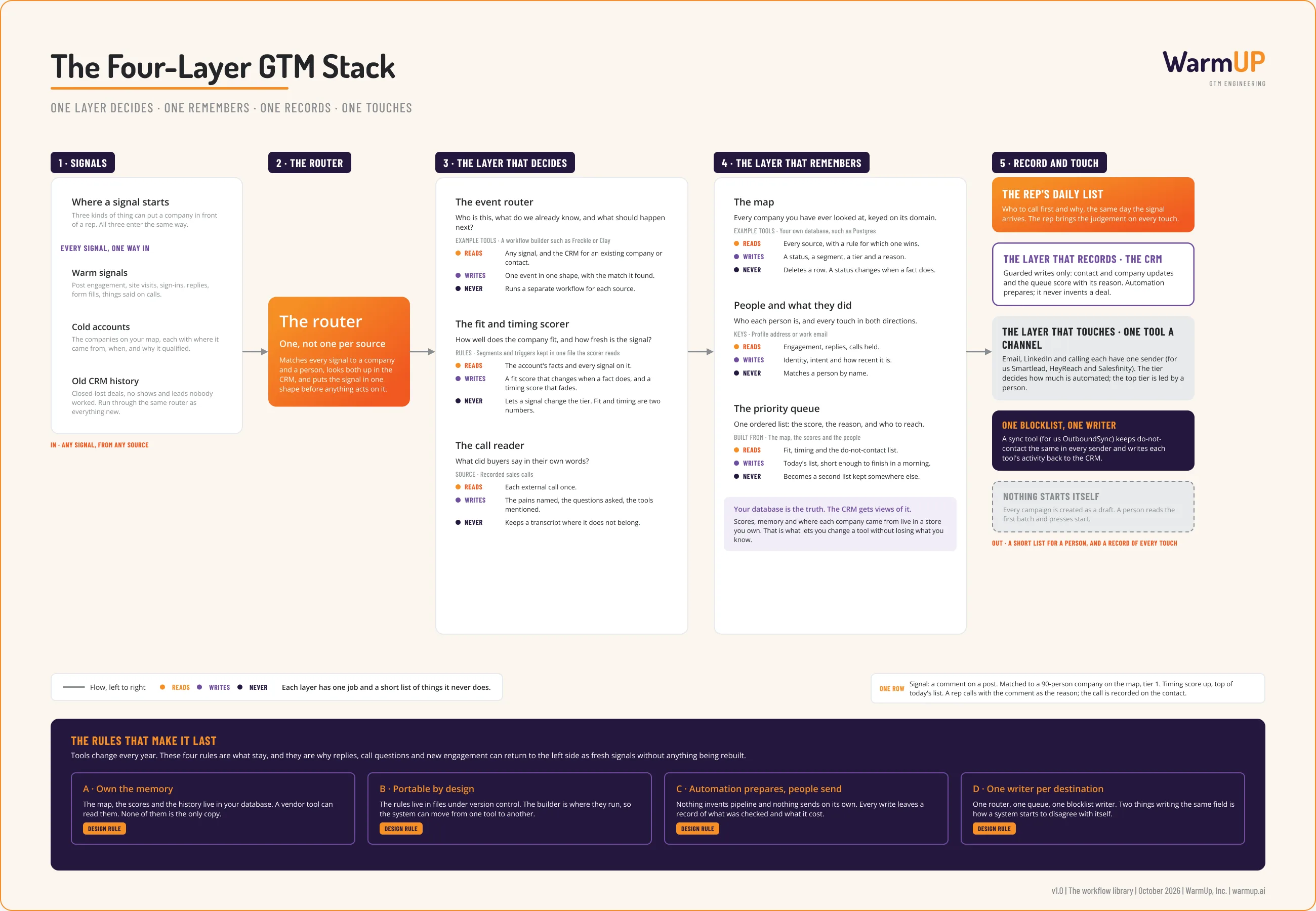
Left to right, following the numbers: where signals start, the router, the layer that decides, the layer that remembers, and the two layers a person sees (the record and the touch). Each card lists what that part reads, what it writes, and the one thing it never does. Open the board to see it full size.
Why it helps
Most teams I talk to own the tools: a CRM, a data tool, a sender or three. What they do not have is an answer to a plain question: when two of those tools disagree about a company, which one is right? Without an answer, every new tool adds another copy of the truth, and the rep ends up checking three places before a call.
This layout answers it by giving each layer one job. One layer decides what a signal means. One remembers everything, in a database you own. One records what happened, where the team already works. One touches the buyer. The map, the hiring feed and the social play are all parts of the first two layers.
The tools in the last column are the ones we use today, and they are not the ones on the first drawing of this board. We changed senders in September 2026. That is the kind of change the layout is meant to absorb, and it is why the tools are named as examples and the layers are not.
Why we built it this way
- One router, not one workflow per source. Every signal, warm or cold or dug out of old CRM history, is matched to a company and a person and put in one shape before anything acts on it. A new source is a new input to the router and nothing else.
- Fit and timing are two numbers. Fit belongs to the account and changes when a fact does. Timing belongs to the signal and fades. A signal moves an account up inside its tier and never changes the tier.
- Your database is the truth. The CRM gets views of it. We ruled this in August 2026. The CRM is where people work, so it shows the ranked list with reasons. It is never the only copy.
- One queue. Everything upstream exists to produce one ordered list a rep can finish in a morning, with the reason to call beside each name.
- One sender per channel, one blocklist writer. Email, LinkedIn and calling each have one tool. One sync tool keeps do-not-contact identical in all of them and writes their activity back to the CRM.
- Automation prepares, people send. Nothing creates a deal and nothing starts a campaign on its own. Every write leaves a record of what was checked and what it cost.
- Replies come back in at the left. A reply, a question on a call or new engagement is a fresh signal. The loop is the same router, so nothing is rebuilt to close it.
How to build it
- Name your four layers before you name a tool. Write one line each: what decides, what remembers, what records, what touches. If one tool is doing two of these, write down which copy wins.
- Stand up the memory first. One database you own, with three tables to start: companies keyed on domain, people keyed on profile address or work email, and signals you only ever add to.
- Build one router. Every source posts to it. It looks the company and the person up, fills in what is missing, and writes one event in one shape.
- Put the rules in files. Segments, triggers, title lists and weights live under version control. The workflow builder reads them. This is what lets you change builders later.
- Score in two numbers. Store both on the account: fit, and timing with its decay.
- Build the queue as a view of the database. Then show it in the CRM as a list with the score and the reason. Keep it short enough to finish.
- Give each channel one sender and the blocklist one writer. Before you add a second writer to any field, decide which one is being retired.
- Send every reply and outcome back to the router. As a signal. And give the whole thing a reader: one ledger of what ran, what it decided and what it spent.
Copy this
The contract between layers
What each layer reads, what it writes, and what it never does. The tools in the comments are examples. The contract is the part to keep.
# layers.yaml
decide:      # a workflow builder, e.g. Freckle or Clay
  reads:   [any signal, the CRM for an existing match, the rules files]
  writes:  [one event in one shape, a fit score, a timing score that fades]
  never:   [a separate workflow per source, a tier changed by a signal]
remember:    # a database you own, e.g. Postgres
  reads:   [every source, with a rule for which one wins]
  writes:  [the map (status, segment, tier, reason), people and every touch, today's queue]
  never:   [a deleted row, a person matched by name, a second queue kept elsewhere]
record:      # the CRM
  reads:   [views of the database, activity from the senders]
  writes:  [contact and company updates, the queue score with its reason]
  never:   [a deal created by automation, the only copy of a score]
touch:       # people, plus one sender per channel
  reads:   [today's queue, the do-not-contact list]
  writes:  [replies and outcomes, back to the router as new signals]
  never:   [a campaign started by code, a second blocklist]
rules:
  - one writer per destination
  - rules live in files under version control
  - every write leaves a record of what was checked and what it cost
The same guide as plain Markdown, for an agent or a notes app: /library/four-layer-gtm-stack.md
Words we use
- Layer:
- One of four jobs in the stack: decide, remember, record, touch.
- Router:
- The one step every signal passes through. It matches the signal to a company and a person and puts it in one shape before anything acts on it.
- Fit and timing:
- Two separate numbers. Fit is how well a company matches who we sell to, and it belongs to the account. Timing is how fresh the signal is, and it fades.
- Queue:
- The one ordered list a rep works from, with a score and a reason to call beside each name.
- Sender:
- A tool that delivers messages or calls on one channel: email, LinkedIn or the phone.
- Blocklist:
- The companies and people we must never contact. One tool writes it, and every sender reads the same copy.
The full build guide
The same guide with the board at full size, kept on our Notion site with the rest of the library.
Open the build guide →Want your tools arranged this way?
We build it, run it with you, and hand it over, with an engineer who can keep it running. Or hire that engineer directly.
30 minutes to scope it. Engagements are contracted through WarmUp, Inc.